Shopify Customer Support Automation with AI (The Practical Guide for 2026)
If you’re searching for shopify customer support automation, here’s the simplest answer:
Automate the repetitive questions (WISMO, returns, product FAQs), keep humans for edge cases, and connect your AI to Shopify data so it can answer like a real agent—not a canned chatbot.
This guide walks you through the workflows that matter, how to set them up, and how to scale support without torching CSAT.
What is Shopify customer support automation?
Shopify customer support automation means using tools (AI + rules + integrations) to handle common customer requests automatically—across chat, email, social DMs, and messaging apps—without making customers repeat themselves.
In practice, automation should do three things:
- Answer instantly (FAQ + policy questions)
- Take action (track orders, update details, start returns)
- Escalate smartly (handoff with context when needed)
Why Shopify stores automate customer support (and why now)
If this sounds familiar, you’re exactly the target audience:
- “Where is my order?” messages spike after every promo.
- Returns and exchanges eat hours every week.
- Customers DM on Instagram, then email, then message again (same issue).
- You’re hiring support… but the ticket volume grows faster than headcount.
Automation helps you keep response times low and consistency high—especially during seasonal peaks.
The best Shopify customer support automation workflows (start here)
Below are the “high ROI” workflows to automate first for most Shopify stores.
1) Order tracking (WISMO) automation
This is usually the biggest volume driver.
What to automate
- Order status + shipping updates
- Tracking link delivery
- “It says delivered, but I don’t have it” triage
- Address change requests (pre-fulfillment)
Self-serve win: Link customers to Shopify’s Order Status Page so they can track without contacting you.
External resource: Shopify Help Center: Order status page
Voice-search-ready example
“Where’s my order?”
Answer with: order status + expected delivery + next step if delayed.
2) Returns & refunds automation
Returns are emotional. Automation works best when it’s clear and calm.
What to automate
- Return eligibility checks (time window, condition)
- Return instructions
- Exchange vs refund options
- Refund timeline expectations
External resource: Shopify Help Center: Return rules & policy
3) Product Q&A automation (pre-purchase)
This is where support turns into sales.
What to automate
- Sizing/fit questions
- Materials + care instructions
- “What’s the difference between X and Y?”
- Compatibility (devices, add-ons, bundles)
- Stock/availability questions (when connected)
Quick playbook
- Ask 1–2 clarifying questions max.
- Recommend 1 primary option + 1 alternative.
- Add a direct “buy” nudge.
4) Shipping policy + delivery estimates automation
Customers ask these constantly—and they’re easy to answer consistently.
What to automate
- Shipping methods and timeframes
- International shipping rules
- Customs/duties messaging
- “Can I expedite this?”
5) Discount + promo code automation
What to automate
- How to apply codes
- Code not working troubleshooting (cart rules, exclusions)
- First-time buyer promos (when appropriate)
6) Account and login help automation
If you use customer accounts, you’ll get basic access questions.
External resource: Shopify Help Center: Reset password
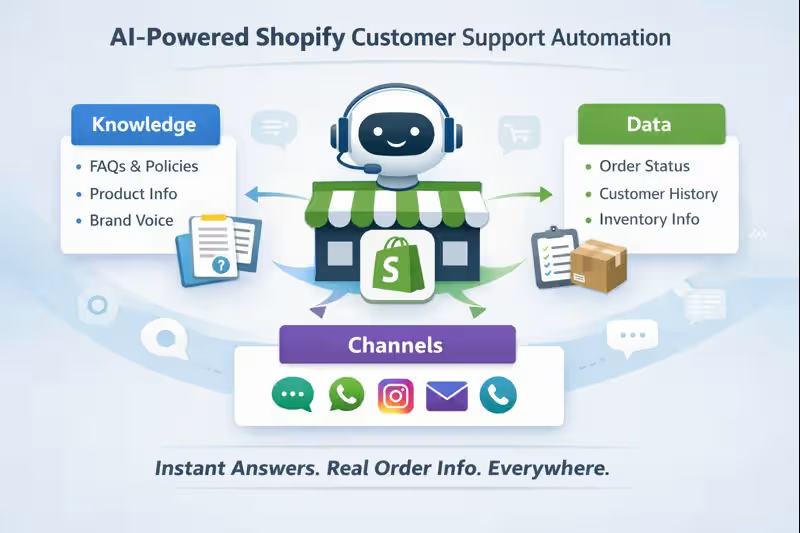
How AI-powered Shopify customer support automation actually works
Great automation isn’t “more bots.” It’s better context.
Knowledge layer (answers that stay on-brand)
Your AI needs your:
- Policies (shipping/returns/warranty)
- FAQs
- Product details, size guides, manuals
- Brand voice guidelines
If you use MessageMind, this is where structured onboarding helps. See: MessageMind Onboard
Data layer (answers that are personal)
This is what makes replies feel human:
- Order status
- Tracking info
- Customer history (when available)
- Inventory and product details
Start here: MessageMind Integrations
Channel layer (answer where customers actually message)
Shopify stores rarely live on “website chat only.” Customers show up everywhere: web chat, Instagram DMs, Facebook, WhatsApp, email, SMS.
MessageMind is built for omnichannel service inside one experience: MessageMind Platform Overview
A step-by-step setup plan you can implement this week
Step 1: Audit your top 25 ticket types
Pull last month of conversations and list:
- Top questions by volume
- Top issues by revenue impact (refunds, chargebacks, cart abandonment)
- Top frustration points
Step 2: Choose your “automation first” workflows
Pick 3 to start:
- Order tracking (WISMO)
- Returns/exchanges
- Product Q&A (sizing, compatibility, shipping)
Step 3: Create “safe” automation rules
Your AI should automatically escalate when:
- The customer is angry / high-risk (chargeback language, threats)
- The request is outside policy
- The issue requires sensitive judgment (fraud, medical, legal)
- The customer asks for a human
Step 4: Connect Shopify + your channels
Keep it simple:
- Connect your store data and customer-service channels
- Confirm the AI can answer “Where is my order?” end-to-end
If you want a Shopify-focused setup, start here: AI Customer Support for Ecommerce (MessageMind)
Step 5: Train your agent on real conversations
Use real ticket language. Real customers don’t say “shipment status.” They say:
- “It’s been 9 days.”
- “Tracking hasn’t moved.”
- “It says delivered.”
Step 6: Launch with a soft rollout
Start with:
- After-hours automation
- One channel (website chat or email)
- A limited set of intents (WISMO + returns)
Step 7: Optimize weekly
Use coaching + analytics to:
- Spot where the AI hesitates
- Improve resolutions
- Tighten or expand automation boundaries
See: MessageMind Coach
KPIs to track for long-term SEO + CX wins
Support automation doesn’t just reduce workload—it can improve brand reputation and customer sentiment (which affects reviews, repeat purchases, and branded search).
Track:
- Automated Resolution Rate (what % gets solved without humans)
- First Response Time
- Time to Resolution
- Escalation Rate (too high = AI is timid; too low = risky)
- Conversion assist rate (pre-purchase chats that convert)
- Return deflection rate (how often exchanges/store credit are chosen)
Why MessageMind for Shopify customer support automation
If your goal is shopify customer support automation that feels human, MessageMind is designed around a few core ideas:
- One AI “team member” across customer touchpoints (not a single-channel bot)
- Fast onboarding + training so the agent learns your policies and tone
- Integrations so responses can be specific—not generic
- Ongoing coaching so performance improves over time
Helpful starting points:
FAQ (AEO + voice-search friendly)
How do I automate Shopify customer support?
Start by automating order tracking, returns, and product FAQs. Then connect your automation to Shopify data so it can answer with real order and shipping info instead of generic scripts.
What should I automate first on Shopify?
Order tracking (WISMO) is usually #1, followed by returns/exchanges and product Q&A like sizing and shipping policy questions.
Will AI automation hurt customer satisfaction?
Not if you design it correctly. The best setups answer instantly for simple issues, ask minimal follow-up questions, and escalate to a human with full context when needed.
Do I need coding for Shopify customer support automation?
Often no—many workflows can be launched with a plug-and-play setup and plain-language configuration, especially for common intents like shipping, returns, and FAQs.
Can I automate support beyond my website chat?
Yes. Customers message across channels (social DMs, email, messaging apps). Omnichannel automation is usually where you see the biggest time savings.
CTA: Build Shopify customer support automation that actually converts
If you want shopify customer support automation that resolves tickets and drives revenue (not just deflects), MessageMind is built for that.
- 👉 Book a demo
- 👉 Or start exploring plans on Pricing
If you want, I can also provide:
- a keyword map (primary + secondary + FAQ queries),
- an optimized slug + meta set,
- and a content brief for a supporting cluster (WISMO, returns automation, Instagram DM automation for Shopify).