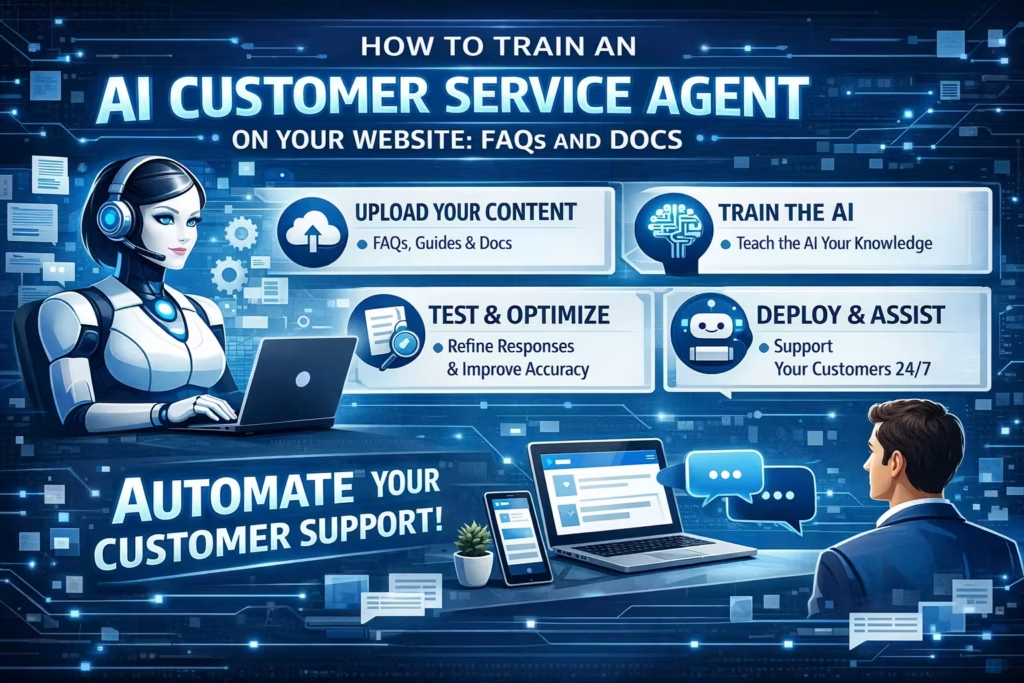
How to Train an AI Customer Service Agent on Your Website, FAQs, and Docs
If you want an AI customer service agent that gives accurate, brand-safe, helpful answers, the goal is not to feed it more content. The goal is to train it on the right content, structure that content clearly, connect it to the systems that matter, and improve it over time.
That is where many support teams get stuck.
They launch an AI agent, upload a few help articles, and expect great results. But if your website is vague, your FAQs contradict your policies, or your docs are outdated, your AI will reflect that confusion back to customers.
In this guide, we’ll show you how to train an AI customer service agent on your website, FAQs, and docs so it can resolve more conversations accurately, escalate when needed, and improve over time.
If you’re building this inside MessageMind, the process typically starts with Onboarding, improves through ongoing Coaching, and becomes much more effective when connected to the right integrations and documentation.
Why training quality matters more than model hype
A powerful model does not fix weak inputs.
If your AI customer service agent is trained on unclear product pages, incomplete policy answers, and messy support documentation, it will still sound polished while giving the wrong answer. That is dangerous. It creates false confidence, inconsistent support, and more work for your human team.
The best AI support setups are built around four things:
- Clear source content
- Well-defined behavior rules
- System integrations for real context
- Continuous coaching and review
That is also why businesses see better results when they treat AI like a trainable team member, not a plug-and-play widget. MessageMind’s approach reflects that idea directly: you can onboard your AI agent, refine how it behaves with Coach, and connect it to key systems through Integrations.
What content should you use to train an AI customer service agent?
The best training base usually comes from three sources:
1. Your website
Your website teaches the AI how your business presents itself publicly.
This usually includes:
- Product and service pages
- Pricing pages
- Shipping and returns policies
- Contact and support pages
- Booking or scheduling pages
- About pages
- Location or availability pages
Your website is especially useful for top-of-funnel and mid-funnel questions like:
- “What do you offer?”
- “How does this work?”
- “Do you ship internationally?”
- “What are your opening hours?”
- “Can I book online?”
If you support customers across chat, social, and web, this becomes even more important. MessageMind is built for that kind of cross-channel support through its Digital channels platform and Email automation.
2. Your FAQs
Your FAQs teach the AI how to answer recurring support questions quickly and consistently.
This is usually your highest-value training material because FAQ content is already close to real customer intent. It tends to map directly to high-volume, repeatable questions such as:
- order tracking
- returns and refunds
- cancellations
- appointment changes
- delivery timing
- account access
- payment methods
- warranty questions
If your FAQ section is weak, your AI will struggle with exactly the questions you want it to automate first.
3. Your docs and help center
Your documentation gives the AI more detailed, procedural knowledge.
This is where you teach it the difference between a short answer and a correct answer.
Useful training sources include:
- help center articles
- onboarding guides
- troubleshooting docs
- setup instructions
- internal SOPs adapted for customer-facing use
- policy documents
- escalation rules
- workflow instructions
If you already use a knowledge base, MessageMind’s Documentation hub is a relevant internal reference point because it centers AI agent knowledge, behavior, integrations, and management.
4. Your connected systems
Content alone is not enough for high-quality automation.
Your AI agent should not guess order status, booking availability, or account context. It should retrieve that information from the right systems when possible. That is where integrations matter.
For example:
- ecommerce stores may connect order and stock data
- service businesses may connect booking systems
- support teams may connect help center and CRM context
- omnichannel teams may unify website chat, email, and messaging workflows
The result is a smarter agent that can answer specifically, not generically.
What not to use for training
Not every document belongs in your AI knowledge base.
Avoid training your customer-facing AI on:
- outdated docs
- duplicate policy pages
- internal notes with conflicting instructions
- draft content
- legal text without plain-language summaries
- Slack-style fragments copied without context
- long pages that bury the actual answer
A simple rule: if a human support hire would be confused by the document, your AI will be too.
How to prepare your website, FAQs, and docs before training
Before you train anything, clean the content.
Remove contradictions
If your return policy says 14 days in one place and 30 days in another, your AI has no reliable truth to follow.
Start by reviewing:
- shipping policy
- returns policy
- pricing details
- cancellation rules
- service availability
- support hours
- refund terms
Choose one source of truth for each topic.
Rewrite vague copy into answer-first copy
Marketing copy often sounds nice but answers nothing.
For example:
Weak: “We offer flexible delivery options designed around your lifestyle.”
Better: “We offer standard delivery in 3–5 business days and express delivery in 1–2 business days.”
AI performs better when your content is explicit, concrete, and easy to retrieve.
Break long pages into clear sections
Good AI retrieval depends on clean structure.
Use:
- clear headings
- short paragraphs
- bullet lists where helpful
- one topic per section
- consistent terminology
This helps both search engines and AI systems understand the page more reliably.
Define tone, boundaries, and handoff rules
Training is not only about knowledge. It is also about behavior.
You should define:
- brand tone
- formality level
- words to avoid
- escalation triggers
- when the AI should say “I’m not certain”
- when the AI should hand off to a human
This is where a coaching layer matters. MessageMind’s Coach is built around gradually refining your AI agent’s behavior, tone, and performance.
How to train an AI customer service agent step by step
Step 1: Audit your current support questions
Start with real conversations, not guesses.
Review your highest-volume support requests from:
- website chat
- social DMs
- contact forms
- call logs
- support inboxes
Group them into common intent clusters such as:
- product questions
- delivery questions
- refunds and returns
- bookings
- troubleshooting
- account help
- policy questions
A practical way to prioritize is to start with high-volume, low-risk, high-clarity questions. MessageMind already covers that framework well in AI Customer Service Automation: What to Automate First (and What Not To).
Step 2: Match each intent to a source of truth
For each question type, identify the best source.
For example:
- “Where is my order?” → ecommerce integration or tracking system
- “What is your return policy?” → policy page or FAQ
- “How do I reset my account?” → help doc
- “Can I reschedule my appointment?” → booking workflow or scheduling doc
This step matters because not every answer should come from the same place.
Step 3: Build a clean knowledge base
Now organize the content so your AI can retrieve it cleanly.
Your training base should include:
Website content
Use high-intent customer-facing pages with accurate, plain-language answers.
FAQ content
Turn recurring questions into concise answer blocks.
Documentation
Use deeper procedural material for troubleshooting and step-by-step support.
Behavior instructions
Add brand tone, escalation rules, compliance notes, and boundary conditions.
The goal is not maximum volume. The goal is high signal.
Step 4: Connect your AI to live business context
A knowledge base answers general questions. Integrations answer live questions.
If your AI needs to help with:
- orders
- shipping
- bookings
- product inventory
- account-specific details
it should be connected to systems that provide current data. That is where MessageMind Integrations become especially valuable.
For ecommerce teams, this matters even more. If that is a major use case, the internal blog post on Shopify customer support automation is a useful related read.
Step 5: Create human handoff rules
A well-trained AI knows what not to automate.
Set clear escalation rules for:
- angry customers
- billing disputes
- legal or compliance-sensitive issues
- account security concerns
- edge cases with missing data
- VIP customers or high-value accounts
- emotional or urgent situations
This protects CX quality while letting automation handle the predictable work.
If your business deals with heavy inbound messaging volume, this connects well with MessageMind’s post on handling high-volume DMs with AI and human handoff.
Step 6: Test your AI like a real customer
Do not test with ideal questions only.
Test with:
- vague questions
- incomplete messages
- misspellings
- multi-part questions
- contradictory inputs
- emotional language
- channel switching
Good test prompts to use
- “I ordered last week and still haven’t got anything”
- “Can I return this if I already opened it?”
- “Do you have this in stock and can it arrive before Friday?”
- “I need to change my booking but I can’t find the email”
- “Why was I charged twice?”
These are the real-world tests that reveal weak content and brittle workflows.
Step 7: Coach continuously
Training is not a one-time project.
Once your AI is live, review:
- unanswered questions
- low-confidence answers
- incorrect replies
- escalations
- customer satisfaction feedback
- resolution rate by intent
Then improve the content and behavior in small loops.
This is where many teams plateau. They launch, then stop training. The better approach is continuous refinement through feedback and coaching. That is exactly the operational logic behind MessageMind’s Coach platform.
Common mistakes when training AI on website, FAQ, and doc content
Mistake 1: Treating every page as equal
A homepage paragraph is not as useful as a clear return policy or step-by-step troubleshooting guide.
Prioritize answer-rich content.
Mistake 2: Feeding the AI messy documentation
If your docs are inconsistent, duplicated, or outdated, you are training confusion.
Mistake 3: Ignoring live systems
Some answers should be retrieved, not generated. Order status and booking availability are classic examples.
Mistake 4: Optimizing for deflection only
Your goal is not to block customers from humans. Your goal is to resolve the right conversations fast and escalate the rest cleanly.
Mistake 5: Never reviewing conversations
The fastest way to improve AI support is to review where it failed, then update the knowledge and guidance.
SEO, AEO, and VSO angle: why this topic matters
This topic works well for long-term search growth because it matches how buyers actually search.
Traditional SEO queries include:
- how to train an AI customer service agent
- train chatbot on website content
- AI knowledge base for customer support
- train AI on FAQs and docs
AEO and VSO queries are even more conversational:
- “How do I train an AI support agent on my website?”
- “Can I use my FAQs to train a customer service chatbot?”
- “What documents should I give an AI customer support agent?”
- “How do I make an AI agent answer correctly?”
That is why this page should include short direct answers, clear headings, and a FAQ section written in natural language.
For content quality, it is also smart to align with Google’s guidance on helpful, reliable, people-first content. If you add structured data, follow Google’s structured data policies. And if your team is thinking seriously about AI safety and governance, the NIST AI Risk Management Framework is a useful external reference.
FAQ: AEO and voice-search friendly answers
How do you train an AI customer service agent?
You train an AI customer service agent by giving it accurate source content, clear behavior rules, and access to the systems it needs for live customer context. The best inputs usually come from your website, FAQs, support docs, and key integrations.
Can I train an AI chatbot on my website and FAQs?
Yes. Your website and FAQs are often the best starting points because they contain your most common customer-facing information. The key is to clean and structure that content first so the AI retrieves clear answers instead of contradictory ones.
What is the best content to use for AI customer service training?
The best content is high-clarity, customer-facing content with stable answers: FAQs, policy pages, product or service pages, onboarding docs, troubleshooting guides, and workflow documentation. Avoid outdated or conflicting material.
Why does an AI support agent give wrong answers?
Usually because the source content is weak, unclear, duplicated, or outdated. In many cases, the issue is not the model. It is the training material and the lack of clear escalation rules.
Should AI answer every support question?
No. AI should answer predictable, low-risk questions and escalate complex, sensitive, or high-stakes conversations to a human with context.
Do I need integrations to train an AI customer service agent?
You need content to train the AI, but you need integrations if you want it to answer live questions accurately, such as order updates, booking availability, stock levels, or account-specific details.
Final takeaway
If you want to train an AI customer service agent well, start here:
- clean your website content
- strengthen your FAQs
- organize your docs
- connect the right systems
- define handoff rules
- review conversations and coach continuously
The best AI support experiences do not come from dumping information into a model. They come from building a reliable support system around knowledge, behavior, and iteration.