How to Use AI for Customer Experience Automation Across Every Channel
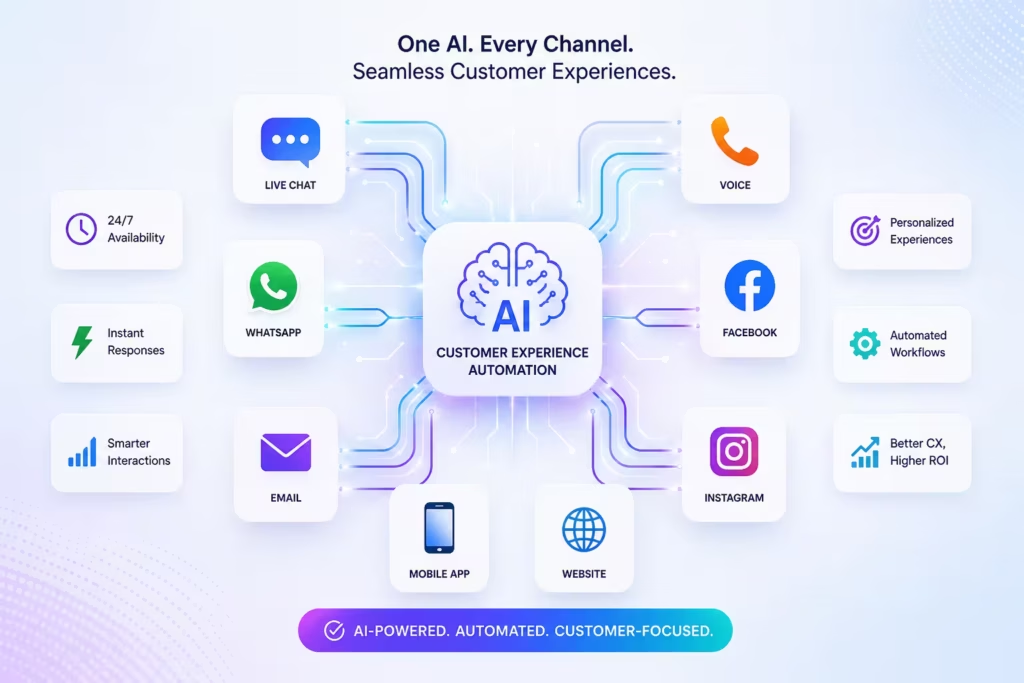
Customer expectations have changed. People want quick answers, personalized support, and consistent service whether they reach out through website chat, WhatsApp, Instagram, Messenger, SMS, email, or phone.
That is where customer experience automation becomes valuable. With the right AI tools, businesses can automate repetitive conversations, improve response times, route inquiries intelligently, and create smoother experiences across every channel without making customer interactions feel cold or mechanical.
This guide explains how to use AI for customer experience automation across channels, where automation works best, and how to build a system that improves both service quality and operational efficiency.
What Is Customer Experience Automation?
Customer experience automation is the use of software and AI to improve, streamline, and scale customer interactions across the full customer journey.
This can include:
- answering common support questions automatically
- routing conversations to the right team
- following up with leads faster
- sending proactive updates
- labeling conversations for reporting and workflow automation
- keeping conversations connected across channels
When AI is added to the mix, automation becomes more flexible and more useful. Instead of relying only on rigid rule-based flows, AI can understand intent, respond naturally, and help businesses manage far more conversation volume across more touchpoints.
Why Does Customer Experience Automation Matter Across Channels?
Customers do not think in channels. They think in outcomes.
A customer might discover a brand on Instagram, ask a product question through website chat, follow up on WhatsApp, and later request support by email. If those touchpoints are disconnected, the experience becomes fragmented. Customers repeat themselves, teams lose context, and response quality drops.
AI customer experience automation helps solve this by creating:
- faster first responses
- more consistent service across channels
- better handoffs between automation and humans
- improved visibility into customer conversations
- lower support costs as volume grows
- better lead response and conversion opportunities
For businesses handling customer communication across multiple inboxes, automation is not just about speed. It is also about creating a more reliable and scalable customer experience.
Which Channels Should You Automate First?
Not every business should automate every channel at once. The best starting point depends on where conversation volume is highest and where response delays create the most friction.
Website Chat
Website chat is often the easiest place to begin. It is high-intent, immediate, and well suited to AI-powered FAQs, lead qualification, product guidance, and support triage.
WhatsApp is ideal for customer support automation, order updates, appointment reminders, and sales follow-up, especially for businesses with mobile-first audiences.
Instagram and Messenger
Instagram DMs and Messenger are strong channels for brands that get product questions, order inquiries, or pre-sales conversations through social media.
Email remains important for detailed support requests, escalation handling, and customer follow-up. AI can help categorize, draft, route, and prioritize messages.
SMS
SMS works well for reminders, confirmations, follow-ups, and urgent updates where fast visibility matters.
Voice and Phone Calls
AI voice agents can handle common inbound questions, qualify calls, collect information, and reduce pressure on live teams.
How Does AI Customer Experience Automation Work?
AI customer experience automation usually combines a few core functions.
Intent Detection
AI identifies what the customer is trying to do, such as asking for support, checking an order, requesting a refund, booking a demo, or following up on a lead.
Response Automation
Once intent is understood, AI can answer common questions, gather context, or guide the customer to the next step.
Workflow Routing
Conversations can be sent to the right person, team, or workflow based on urgency, topic, customer segment, or channel.
Omnichannel Context Management
A strong system keeps conversation history connected across touchpoints so customers do not have to start over every time they switch channels.
Human Handoff
Not every interaction should stay automated. AI works best when it knows when to escalate to a human with the right context attached.
How to Use AI for Customer Experience Automation Across Every Channel
The most effective approach is not to automate everything at once. It is to automate the moments that create the most friction or consume the most time.
1. Automate High-Volume Repetitive Questions
Most support teams see the same questions every day:
- Where is my order?
- What are your business hours?
- How do I reset my password?
- Do you ship internationally?
- How can I book an appointment?
These are strong candidates for AI customer support automation. Automating them helps customers get instant answers while freeing human teams to focus on more complex issues.
Best Use Cases
- shipping and delivery questions
- store policies
- appointment scheduling
- billing basics
- product availability
- account access help
2. Use AI to Route Conversations Intelligently
Manual triage slows teams down. AI can detect intent and route conversations based on need, channel, language, urgency, or customer type.
For example:
- sales questions go to the sales team
- refund requests go to support
- VIP customer issues are prioritized
- multilingual inquiries are assigned correctly
This improves speed and makes customer messaging operations much easier to scale.
3. Keep Conversations Connected in a Unified Inbox
One of the biggest obstacles to omnichannel customer experience is fragmentation. If chat, WhatsApp, Instagram, email, and SMS all sit in separate tools, the customer journey becomes harder to manage.
A unified inbox helps teams:
- see customer history in one place
- avoid duplicate replies
- maintain context across channels
- collaborate more effectively
- create better reporting and labeling workflows
This is especially important when automation is active across more than one channel.
4. Automate Lead Follow-Up Alongside Support
Customer experience automation should not stop at support. It can also improve sales responsiveness.
If someone asks about pricing on website chat, sends a question on Instagram, or replies to a WhatsApp campaign, AI can:
- respond instantly
- qualify the lead
- collect contact details
- answer common sales questions
- route hot leads to the right person
- trigger follow-up sequences
For many businesses, faster lead follow-up directly improves conversion rates and reduces missed opportunities.
5. Personalize Responses Using Customer Context
Good automation should feel relevant, not generic.
When AI has access to customer context, it can tailor conversations using details like:
- previous interactions
- order history
- channel preference
- location
- product interest
- stage in the customer journey
This makes automation more useful and more natural. It also helps businesses deliver a more human-like customer experience at scale.
6. Use Conversation Labels to Improve Workflows
Conversation labeling is often overlooked, but it plays a major role in customer experience automation.
Labels can help teams track:
- refund requests
- delivery delays
- product questions
- high-intent leads
- churn-risk conversations
- escalation reasons
With the right system, labels can trigger workflows automatically, improve reporting, and reveal patterns that help teams refine both customer support and sales operations.
7. Add Human Handoffs Where They Matter
The goal of AI automation is not to remove humans from customer experience. It is to let humans focus where they create the most value.
You should design handoffs for:
- sensitive complaints
- complex technical issues
- billing disputes
- high-value sales conversations
- emotionally charged support cases
The best customer experience automation feels seamless because customers can move from AI to a human without losing context.
What Are the Benefits of Omnichannel Customer Experience Automation?
Businesses that automate customer experience across channels often aim for a few practical outcomes.
Faster Response Times
Customers get help sooner, especially on high-volume channels like chat, WhatsApp, and Instagram.
Better Consistency
Responses become more reliable across teams and touchpoints.
Lower Operational Pressure
Support teams spend less time on repetitive work and more time on complex issues.
Improved Customer Satisfaction
Faster and more accurate replies often create smoother experiences.
Stronger Sales Follow-Up
AI can engage and qualify leads quickly before they go cold.
Better Visibility Across the Customer Journey
With omnichannel messaging and shared context, teams get a clearer picture of how customers move between support and sales conversations.
What Should You Avoid When Automating Customer Experience?
Automation works best when it is thoughtfully designed.
Over-Automating Complex Conversations
Not every interaction should stay in AI. Complex cases need a clear route to a human.
Using Separate Tools for Every Channel
Disconnected systems create a poor customer experience and make reporting harder.
Writing Robotic Responses
Automated replies should be clear, helpful, and natural.
Ignoring Measurement
You should track response times, resolution patterns, escalation rates, conversion outcomes, and common inquiry themes.
Treating Support and Sales as Separate Worlds
In many businesses, customer experience spans both. A connected approach often leads to better outcomes.
Quick Answer
AI customer experience automation uses artificial intelligence to manage, improve, and scale customer interactions across channels like website chat, WhatsApp, Instagram, Messenger, SMS, email, and voice. The best approach is to automate repetitive questions, route conversations intelligently, keep channel history connected, personalize responses with customer context, and hand complex cases to humans when needed.
Why This Matters
Customer experience is now a competitive factor, not just a support function. Customers expect quick, consistent, and convenient communication wherever they reach out.
Businesses that still manage each channel separately often face slower replies, missed leads, repeated customer questions, and growing operational pressure. AI customer experience automation helps solve these issues by bringing speed, consistency, and scalability to both support and sales conversations.
How MessageMind Helps
MessageMind helps businesses automate customer experience across channels with human-like AI agents and an AI-native CRM built for customer communication.
With MessageMind, teams can:
- manage website chat, WhatsApp, Instagram, Messenger, SMS, email, and voice conversations in one place
- automate support and sales conversations across channels
- follow up with leads faster
- label and route conversations more intelligently
- create smoother handoffs between AI and human teams
- scale customer communication without losing context
That makes MessageMind a strong fit for businesses looking to improve omnichannel customer messaging, support automation, and customer experience operations in one platform.
FAQs
What is AI customer experience automation?
AI customer experience automation is the use of AI to automate and improve customer interactions across channels such as chat, email, messaging apps, SMS, and voice.
What channels can be automated with AI?
Common channels include website chat, WhatsApp, Instagram, Messenger, SMS, email, and phone or voice interactions.
Is customer experience automation only for large companies?
No. Small and mid-sized businesses can also benefit by automating repetitive questions, improving response times, and reducing manual workload.
What is the difference between customer support automation and customer experience automation?
Customer support automation usually focuses on service tasks like answering FAQs and routing tickets. Customer experience automation is broader and can include sales follow-up, proactive messaging, conversation continuity, and omnichannel coordination.
How do you make AI automation feel more human?
Use natural language, personalize replies with customer context, and make it easy for customers to reach a human when needed.
Why is a unified inbox important for omnichannel customer experience?
A unified inbox helps teams manage all customer conversations in one place, maintain context across channels, and reduce duplicated work.
Final Thoughts
The most effective customer experience automation strategies are practical, channel-aware, and built around real customer needs. Businesses do not need to automate everything at once. They need to automate the right moments, connect the right channels, and create smooth transitions between AI and human support.
Over time, that approach leads to better customer experiences, stronger operational efficiency, and a more scalable foundation for growth.
Call to Action
If your team is managing customer conversations across multiple channels, MessageMind can help you bring them together and automate the repetitive work that slows support and sales down.
Book a demo to see how MessageMind can automate your customer support, or start your free trial to launch your AI customer service agent with a more connected omnichannel workflow.
