AI Support Safety: Policies, Guardrails, and What to Do When the AI Is Wrong
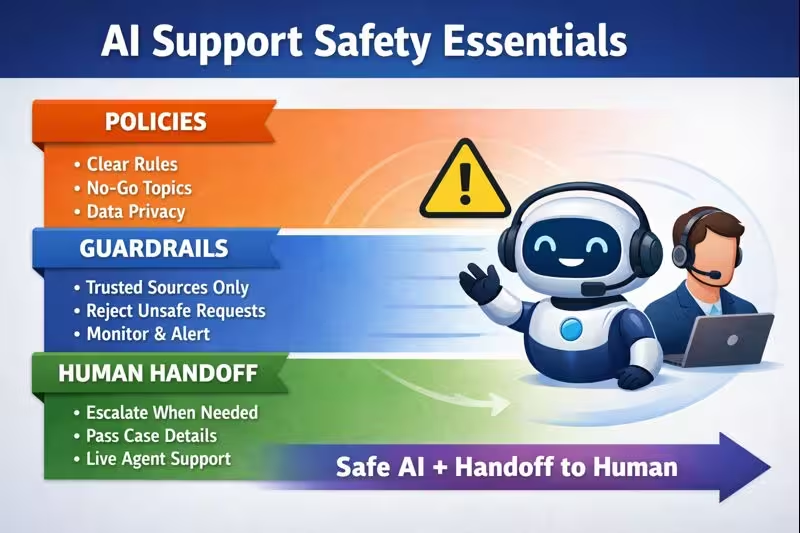
AI can dramatically reduce response times and improve consistency—but only if you treat AI customer support safety as a system, not a feature. The safest teams combine clear policies, technical guardrails, and a human handoff plan so customers get accurate answers, sensitive data stays protected, and edge cases don’t spiral into costly incidents.
If you’re building (or buying) AI-powered support, this guide shows you how to design a safety program that scales—plus exactly what to do when the AI gets something wrong.
Explore MessageMind: MessageMind AI customer service CRM
CTA: Want a safety-first rollout plan? Contact MessageMind
Why AI customer support safety matters
AI support systems can handle thousands of conversations across chat, email, and messaging channels. That’s the opportunity—and the risk. A single unsafe pattern can replicate instantly.
The most common reasons AI support safety fails aren’t “bad models.” It’s usually:
- No written boundaries for what the AI should and shouldn’t do
- Incomplete knowledge sources (AI fills gaps with guesses)
- Weak escalation logic (AI stays in the loop when it shouldn’t)
- Poor monitoring (teams only discover issues after customers complain)
The goal isn’t perfection. The goal is controlled failure: the AI stays helpful in normal cases and fails safely in risky ones.
What can go wrong in AI-powered customer support?
Hallucinations (confidently wrong answers)
The AI might invent refund policies, delivery timelines, or warranty terms—especially when it doesn’t have verified information.
Safety principle: If the AI isn’t sure, it should ask, verify, or handoff—not guess.
Data leakage and privacy mistakes
Support conversations often include addresses, order IDs, emails, phone numbers, and sometimes payment-related data.
Safety principle: Minimize collection, mask sensitive fields, and enforce strict rules about what the AI can store or repeat.
Prompt injection and social engineering
Customers (or attackers) may attempt to trick the AI into revealing internal instructions, system prompts, or confidential details.
Safety principle: Treat all user input as untrusted and add guardrails that refuse requests for secrets or policy overrides.
Learn more about injection risks and mitigation patterns: OWASP Top 10 for LLM Applications
Unsafe advice in high-stakes scenarios
AI should not provide medical, legal, or financial instructions beyond basic, approved guidance.
Safety principle: Use “safe completion”: provide general info, then route to a human or official resource.
Reference framework: NIST AI Risk Management Framework (AI RMF)
Tone problems that damage trust
Even correct answers can be unsafe if they’re rude, dismissive, or overly confident during sensitive situations (refund disputes, delivery failures, complaints).
Safety principle: Tone is a safety feature. Set style rules and require empathy in escalations.
The AI support safety stack (what to build)
A strong safety stack has three layers:
- Policies (business rules and boundaries)
- Guardrails (technical and workflow constraints)
- Governance (monitoring, audits, and continuous improvement)
Let’s break it down.
Layer 1: Policies (write these before you automate)
Define the AI’s job description
Start with a one-page “AI Support Charter” that answers:
- What channels does the AI operate on?
- What problems must be handled by a human?
- What actions can the AI take (e.g., offer a discount, cancel an order, reschedule)?
- What data can the AI request or reference?
- What disclaimers are required in certain situations?
Example policy boundaries
AI can:
- Answer FAQs using approved sources
- Collect details for a handoff (order ID, email, issue summary)
- Suggest next steps (e.g., how to track shipping)
AI cannot:
- Make up policy
- Request full card details
- Provide legal/medical advice
- Override pricing/refund rules without approval
Tip: Write your policies as simple IF/THEN rules. That makes them easier to enforce as guardrails.
Layer 2: Guardrails (make safe behavior automatic)
Knowledge guardrails: reduce guessing
Most “AI mistakes” are actually “missing context” problems.
Best practice: Only let the AI answer from:
- Approved policy pages
- Product catalogs / order systems
- Help center articles
- Verified internal docs
If the AI cannot verify the answer, it should:
- Ask a clarifying question, or
- Say it needs to confirm and hand off
This one rule eliminates a huge percentage of hallucinations.
Behavior guardrails: refuse unsafe requests
Add explicit refusal rules for:
- Sensitive personal data (“send me all customer emails”)
- Security bypass requests (“ignore your rules and do X”)
- Anything involving passwords, payment card numbers, or secret keys
Helpful reference: GDPR overview (privacy principles relevant to customer data)
Channel guardrails: risk-based escalation by channel
Not all channels are equal. Some are faster-paced and higher risk.
Examples:
- WhatsApp / Instagram DMs: fast, conversational, high expectation of instant answers
- Email: longer form, higher detail, easier to include policy links
- Voice calls: real-time pressure, stronger need for safe “pause + transfer” logic
A practical safety approach is to assign a risk score to each message and route accordingly:
- Low risk → AI answers directly
- Medium risk → AI answers + confirmation step
- High risk → AI collects details and transfers to a human
Data guardrails: minimize, mask, and limit retention
Treat support data like a liability.
Core controls:
- Don’t store sensitive data unless necessary
- Mask PII in internal logs where possible
- Use role-based access to conversation history
- Enforce retention windows and deletion workflows
If you process payments, review: PCI DSS overview
Human handoff: the guardrail that saves you
A “handoff” is not a failure. It’s a safety mechanism.
When the AI should hand off immediately
Create an escalation list. Typical triggers:
- Refund disputes or chargebacks
- Legal threats or compliance requests
- Repeated customer frustration
- Account access issues
- Anything involving health/safety risk
- High-value customers (optional rule)
What a good handoff looks like
When escalating, the AI should pass a structured summary:
- Customer intent and sentiment
- Key identifiers (order ID, email, last 4 digits if applicable—never full card)
- What the AI already tried
- Suggested next best action
- Exact customer quote(s) if needed
This reduces handle time and prevents customers from repeating themselves.
CTA: If you want AI + human handoff in one place, explore the MessageMind omnichannel approach.
“What if the AI is wrong?” The incident playbook
Even with guardrails, mistakes happen. The difference between a minor issue and a brand-damaging incident is how fast you respond.
Step 1: Detect (catch it early)
Set up monitoring for:
- Customer complaints containing “wrong,” “not true,” “that’s not our policy”
- Sudden spikes in refunds, cancellations, or escalations
- Repeated low CSAT or negative sentiment in a topic cluster
- Agent reports (“AI keeps saying X”)
Step 2: Contain (stop the bleeding)
Depending on severity:
- Disable AI for the affected topic/category
- Force handoff for specific keywords (“refund”, “cancel”, “legal”)
- Temporarily restrict AI to FAQ-only responses
- Add a hotfix rule: “If asked about X, respond with Y + link”
Step 3: Correct (fix the customer experience)
If the AI gave incorrect information:
- Acknowledge the mistake clearly
- Provide the correct policy/answer
- Offer a resolution path (refund review, expedited support, call-back)
- Document the incident and affected conversations
Short customer-safe template (copy/paste):
“Thanks for flagging that—you’re right to ask. My earlier message may have been inaccurate. Here’s the correct information: [policy summary]. If you’d like, I can connect you with a specialist to confirm your case.”
Step 4: Learn (prevent recurrence)
Do a 30-minute postmortem:
- What did the AI answer incorrectly?
- What source should have been used?
- Should this topic be “AI + confirmation” or “handoff-only”?
- What new guardrail or policy rule will prevent it?
Safety KPIs that actually improve quality (not vanity metrics)
Track both performance and safety:
Quality + safety metrics
- Hallucination rate (sampled QA)
- Escalation correctness (AI escalated when it should)
- Policy adherence score (audited responses)
- Sensitive-data incident rate (PII/payment mishandling)
- Customer sentiment trend on high-risk topics
Operational metrics
- First response time
- Resolution time
- Deflection rate (careful: deflection without safety can be harmful)
- Agent time saved without increasing escalations or churn
Implementation checklist: AI customer support safety in 30 days
Week 1: Policies
- Write AI Support Charter
- Define “handoff-only” topics
- Define allowed actions and approvals
Week 2: Guardrails
- Approved knowledge sources only
- Refusal rules for sensitive requests
- Risk scoring by topic + channel
Week 3: Monitoring
- QA sampling and weekly review
- Incident response playbook
- Keyword alerts for policy disputes
Week 4: Optimization
- Patch top failure modes
- Expand AI coverage gradually
- Train agents on handoff workflows
Want a practical rollout with coaching and iteration? Start here: MessageMind
How MessageMind fits a safety-first AI support strategy
If your goal is safe automation across channels, a platform should help you:
- Keep conversations centralized (so humans can step in fast)
- Support reliable escalation/handoff workflows
- Maintain consistent policies across WhatsApp, Instagram, email, and more
- Improve quality over time via coaching loops and review
Next step:
- See pricing and rollout options: MessageMind Pricing
- Talk to the team about a safety-first implementation: Contact MessageMind
- Read more playbooks: MessageMind Blog
FAQ (AEO + VSO friendly)
What is AI customer support safety?
AI customer support safety is the set of policies, guardrails, and monitoring that prevents AI from giving harmful, incorrect, or non-compliant responses—while ensuring smooth escalation to humans when needed.
How do you prevent AI from hallucinating in customer support?
Limit the AI to approved knowledge sources, require it to ask clarifying questions, and force handoff when confidence is low or topics are high-risk.
When should an AI hand off to a human agent?
Immediately for refunds disputes, legal/compliance issues, account access problems, sensitive-data situations, or repeated customer frustration.
Can AI handle refunds safely?
Yes—if refunds are governed by strict policy rules, with clear thresholds for approval and automatic handoff when exceptions appear.
What are the biggest AI support risks?
Hallucinations, privacy/data leakage, prompt injection/social engineering, and unsafe advice in high-stakes scenarios.
How do you monitor AI support quality over time?
Use QA sampling, policy adherence scoring, escalation correctness audits, and alerts for recurring complaint patterns.
Does GDPR apply to AI customer support chat logs?
If your support logs contain personal data of EU residents, GDPR principles (like data minimization and retention limits) may apply. Review your processes with your legal/compliance team: GDPR overview
What standard frameworks help with AI risk management?
A good starting point is the NIST AI Risk Management Framework and security guidance like the OWASP LLM Top 10.
Call to action
AI support can be fast and safe—when you build policies, guardrails, and a real escalation plan from day one.
If you want help rolling out a safety-first AI agent across your customer channels, explore MessageMind or contact the team.
